
Features / Centerly Assistant
Centerly Assistant
An AI assistant that reads the paperwork, files it, and tells your office what is missing.
What it does
- Reads immunization records, screenings, CPR cards and background checks
- Names and files every scanned document to the right child or employee
- Turns a parent's email into vacation dates, notice checks and correct billing
- Every change waits for one click from your office
10 screens in about 40 seconds. No sound needed.
Why it matters
Most of an office day in a child-care center is not decisions. It is reading a form, finding the right record, typing what the form says, and remembering to follow up. The decisions are easy once that is done.
The Centerly Assistant does the reading, the finding, the typing and the remembering. Your office makes the decision: confirm, change or decline. It is the difference between software that stores your work and software that does some of it.
In practice
Drop in a document
A scan from the copier, a phone photo from a parent, a PDF from the doctor's office. The assistant works out what it is and who it belongs to.
See what it found
It shows the values it read beside the document, what it would change, and what is still missing. If it is unsure, it says so and holds the item.
Confirm with a click
Nothing is saved until a person confirms. Every confirmed change is logged with who approved it, and can be undone.
Centerly Assistant in 10 screens
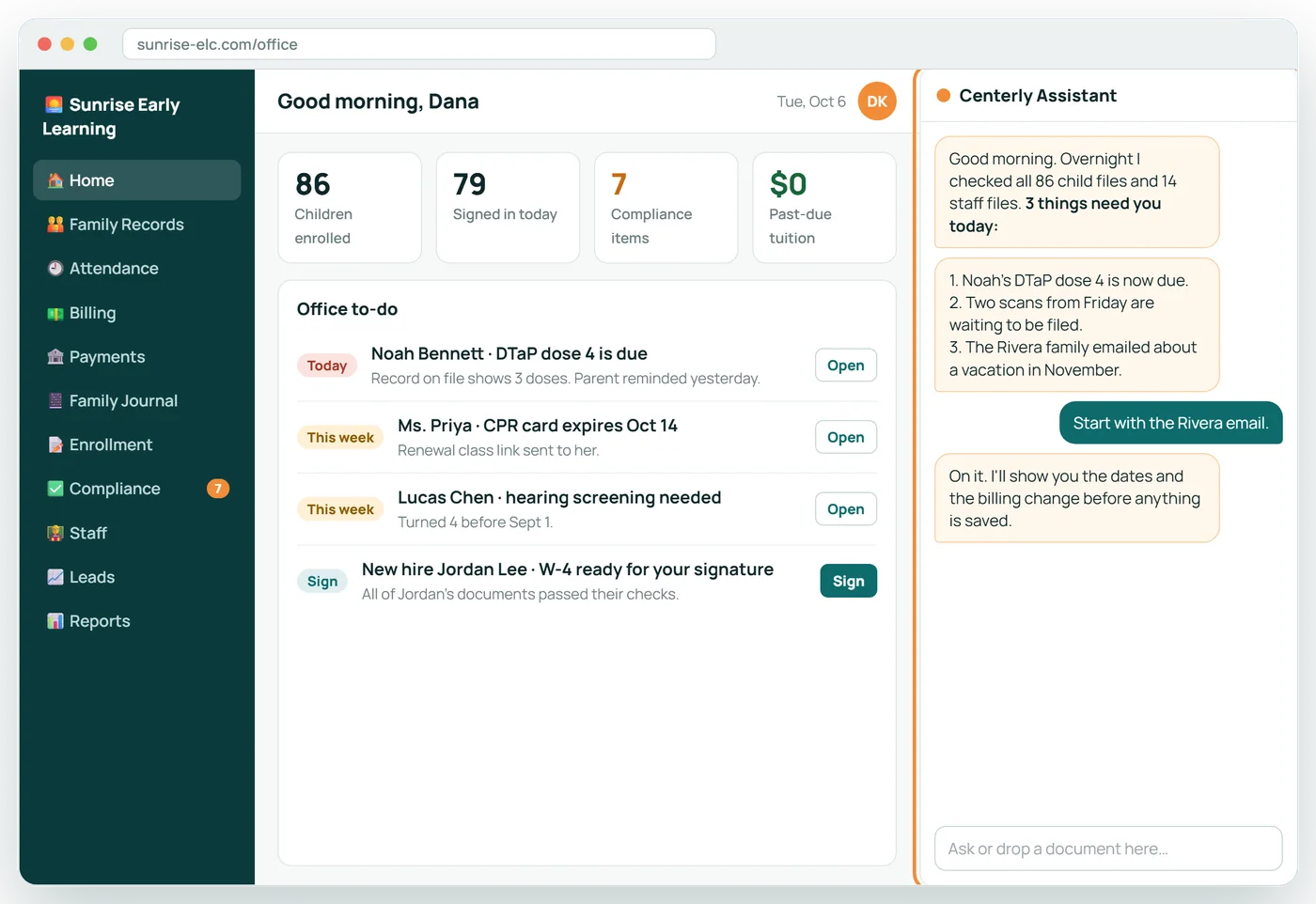
Your office starts the day with a plan
The assistant reviews every child and staff file overnight and tells your office what needs attention first.
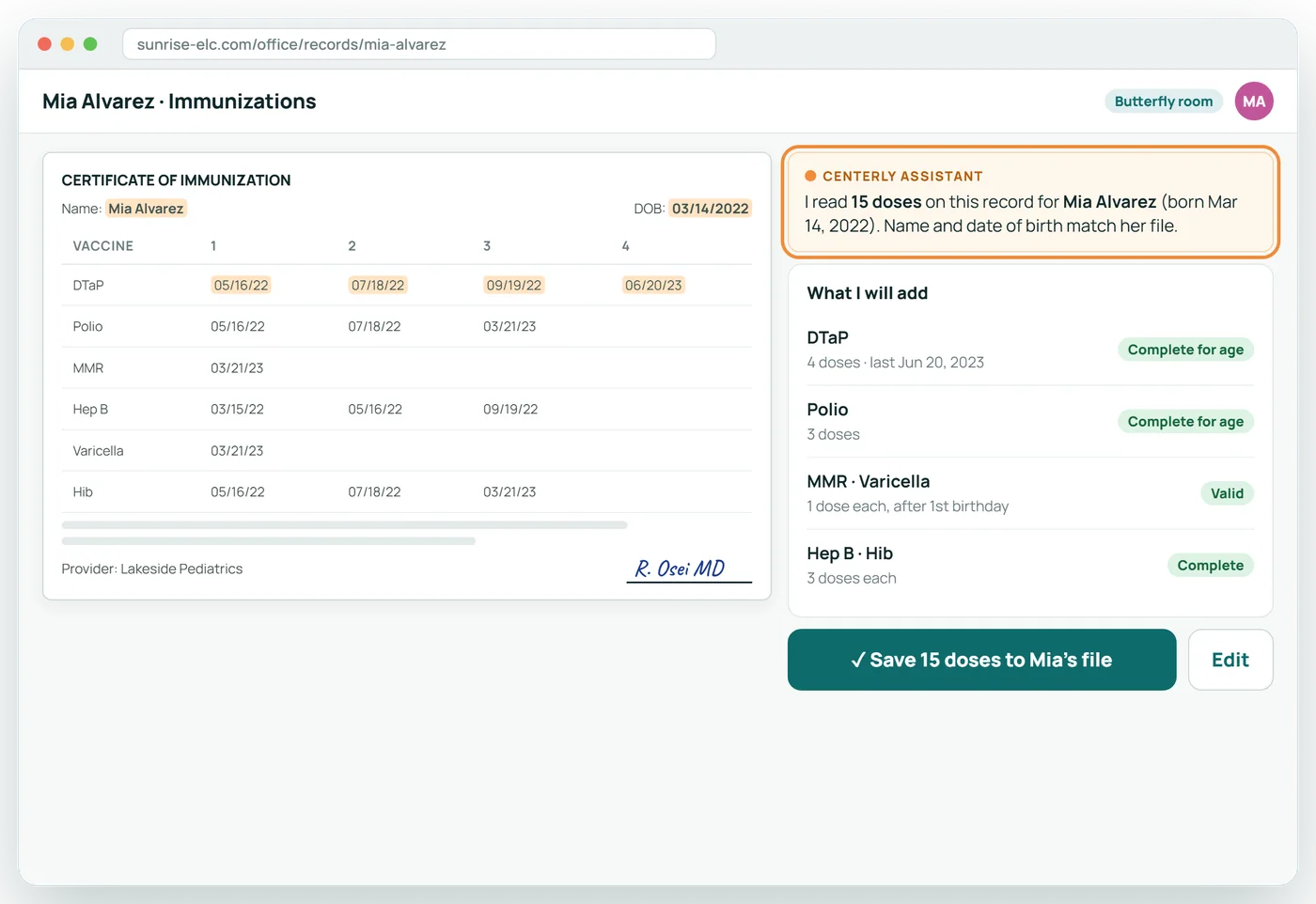
It reads the immunization record for you
Drop in a scan or a phone photo. The assistant finds the child, reads every dose and date, and asks before saving.
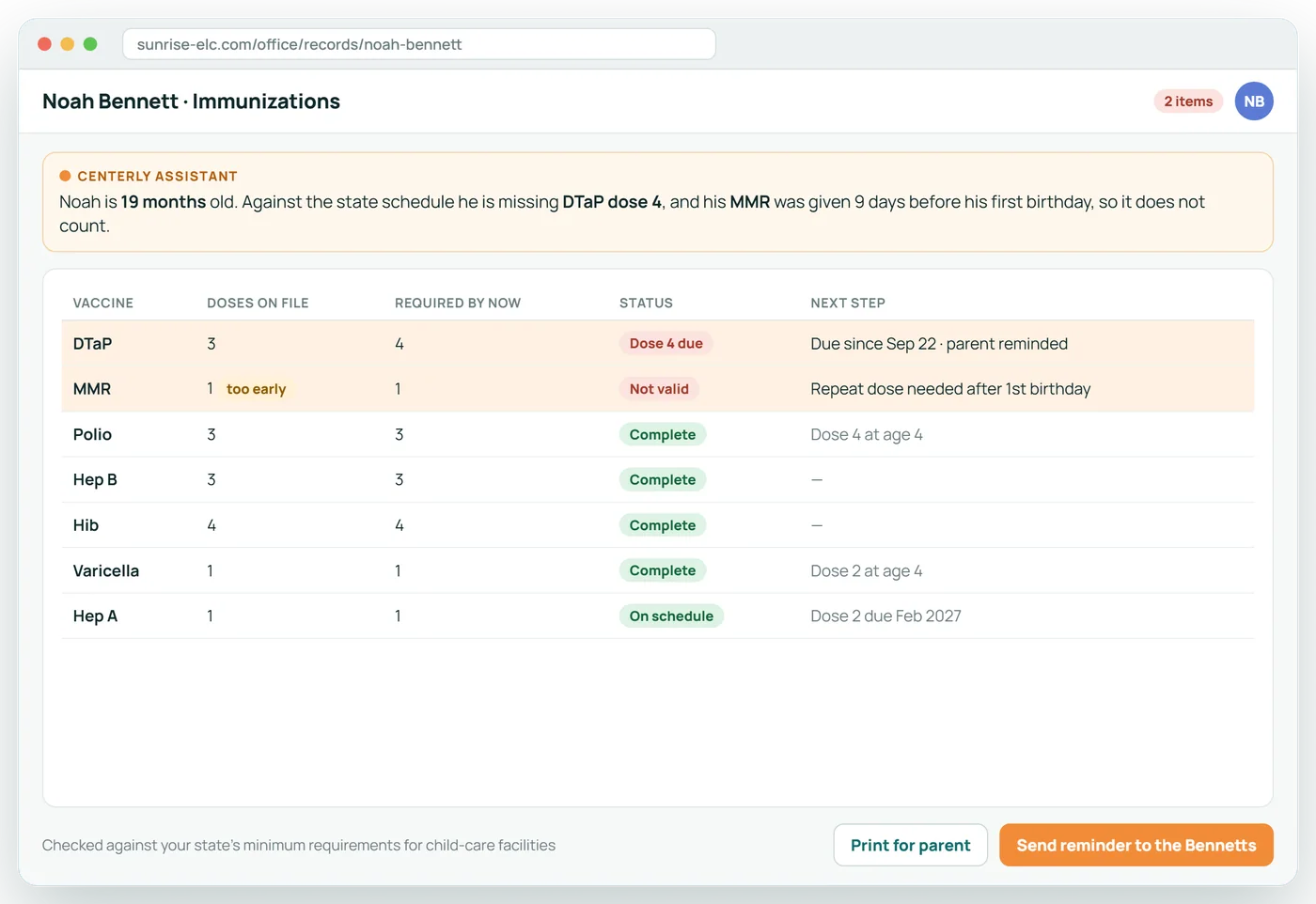
And tells you exactly what is missing
Each dose is checked against your state's schedule. Doses given too early are flagged, and the next due date is worked out for you.
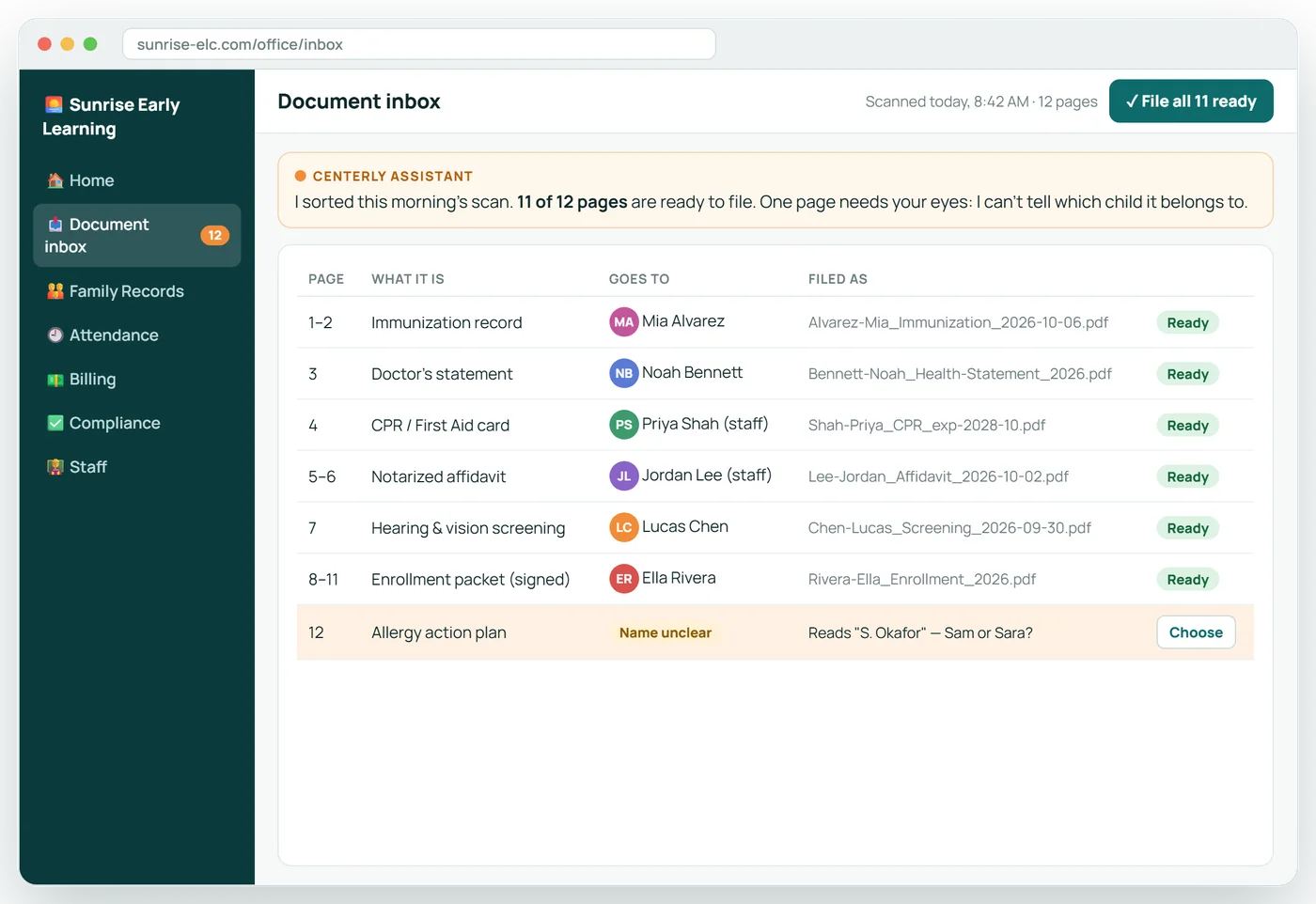
Scan a stack. It files every page.
Each document is named and attached to the right child or employee, with no searching and no dragging into folders.
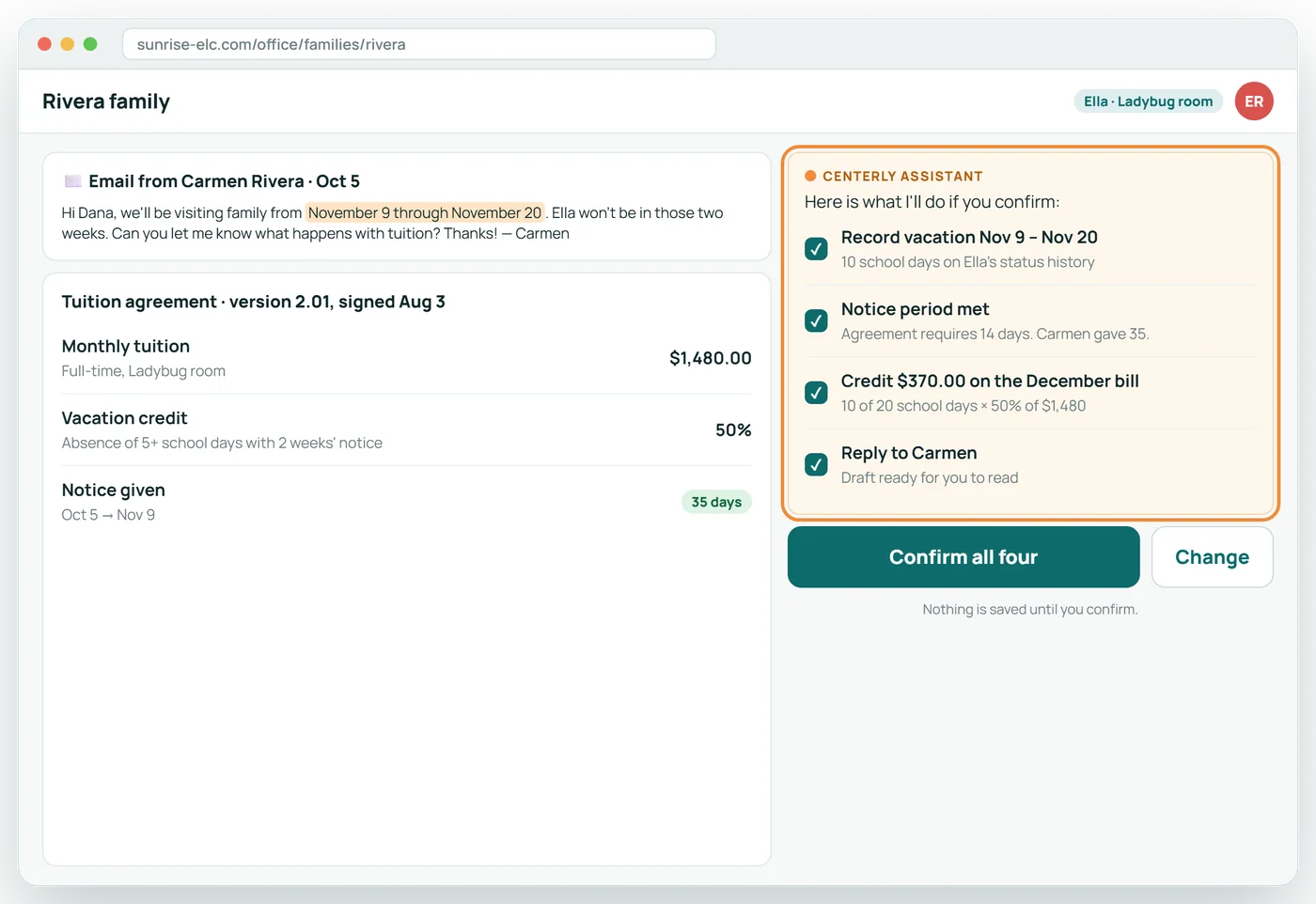
Paste a parent's email. Billing follows.
The assistant records the vacation dates, checks the notice period, and lines the tuition credit up with the family's agreement.
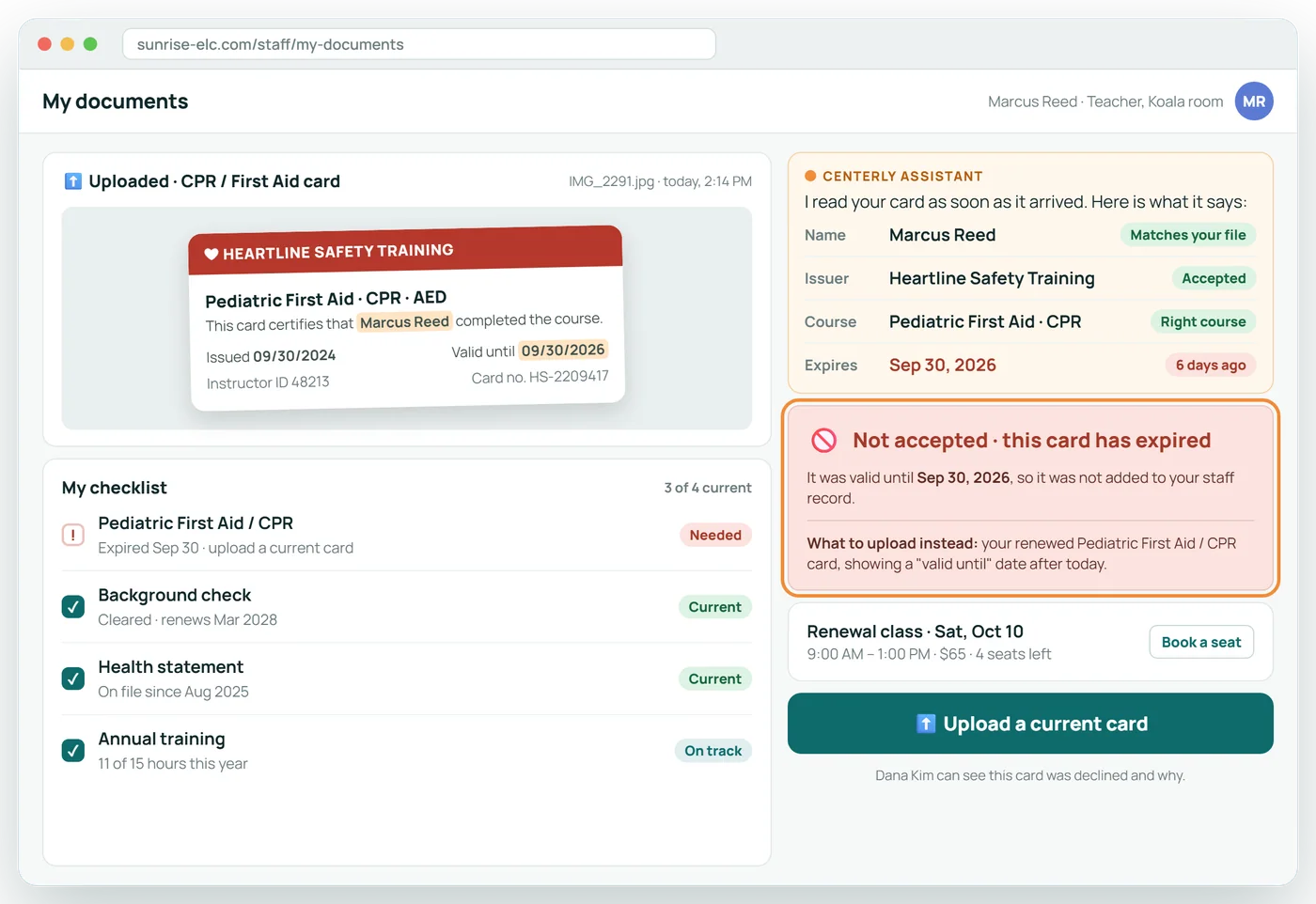
An expired card is turned away at upload
Staff uploads are read the moment they arrive. An expired CPR card is declined on the spot, with the reason and what to upload instead.
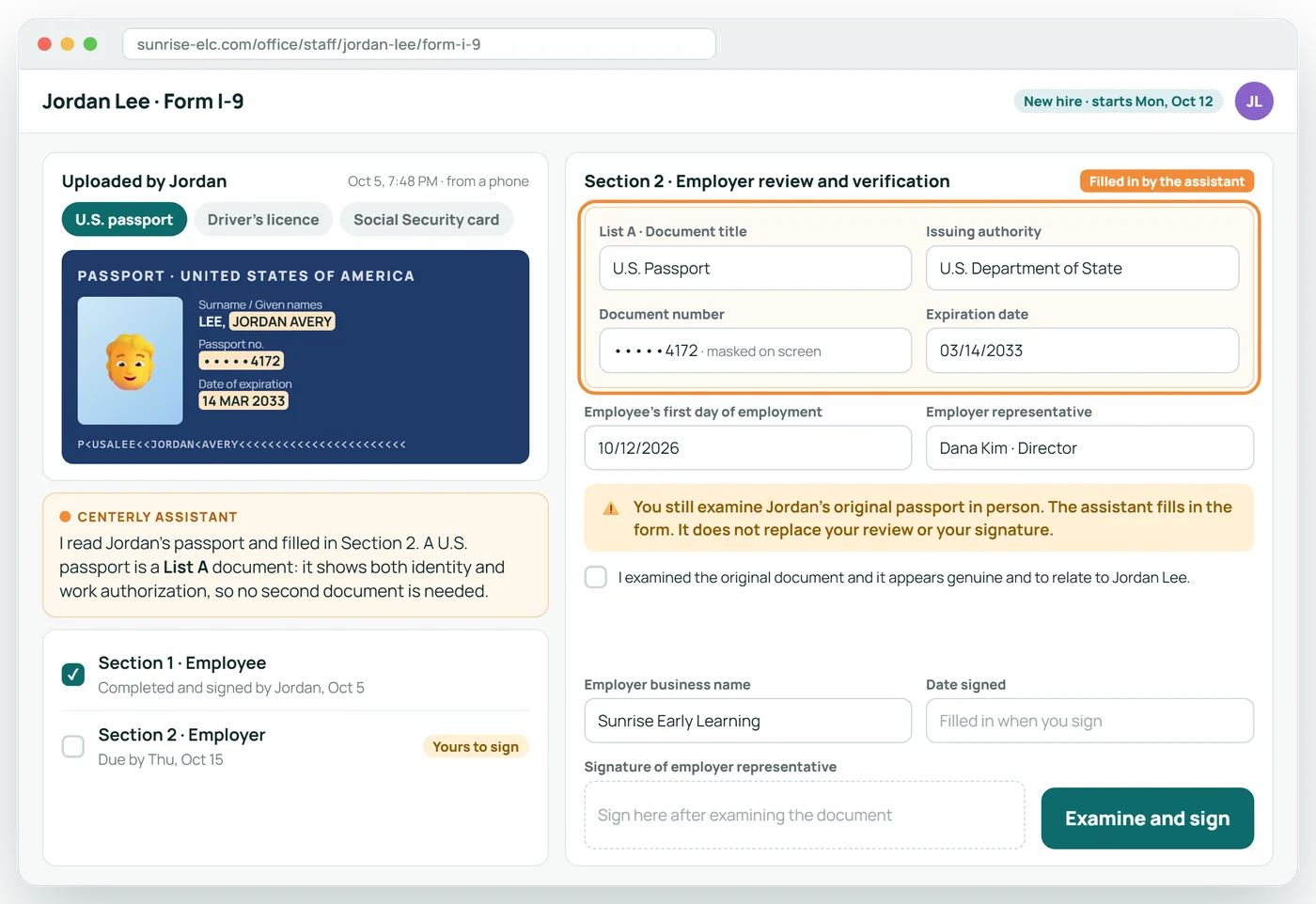
Form I-9, pre-filled from the ID
The assistant reads the new hire's passport or driver's licence and fills in the document details. You still examine the original and sign.
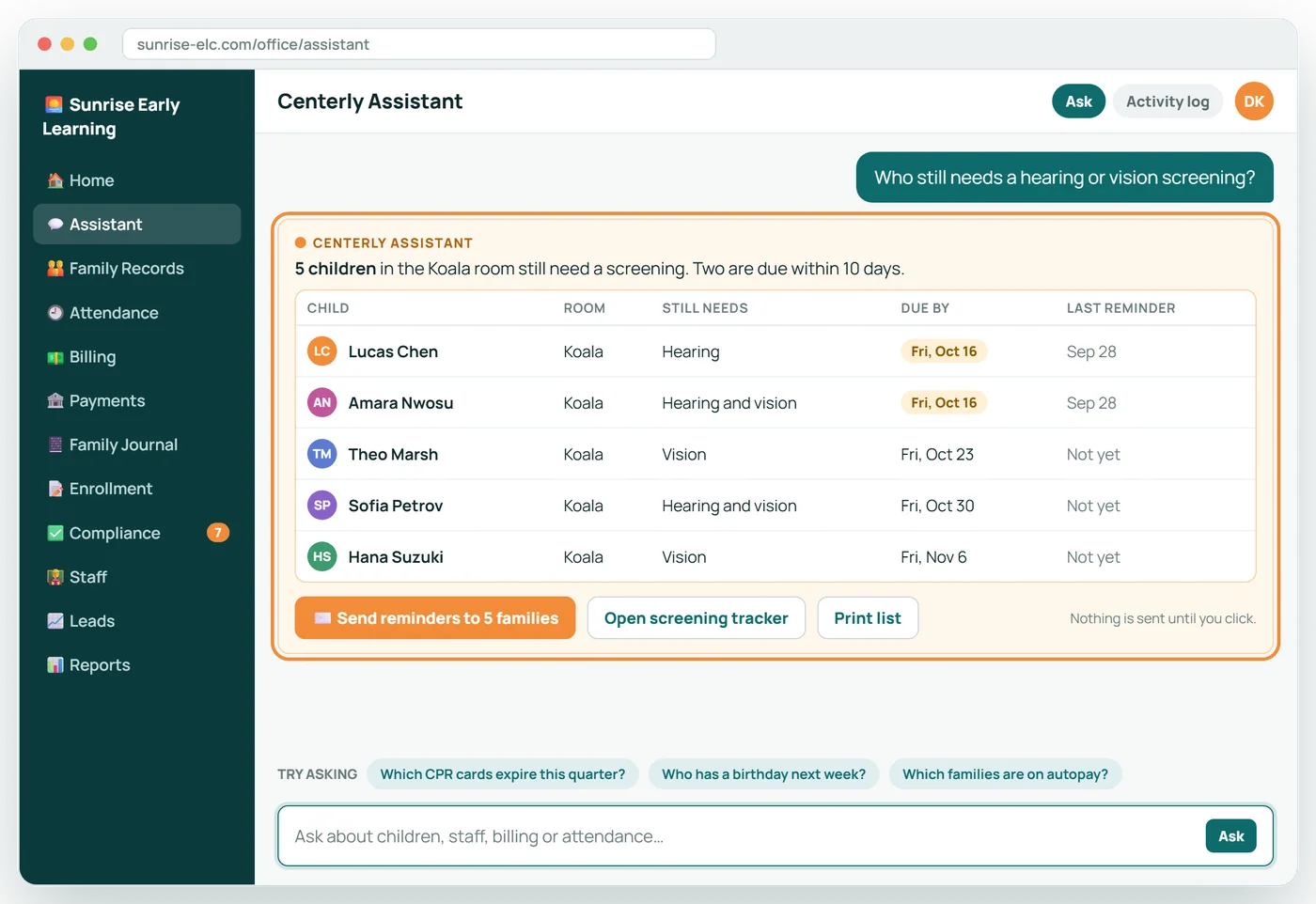
Ask it anything about your center
Plain questions get straight answers from your own records, with the next step one click away.
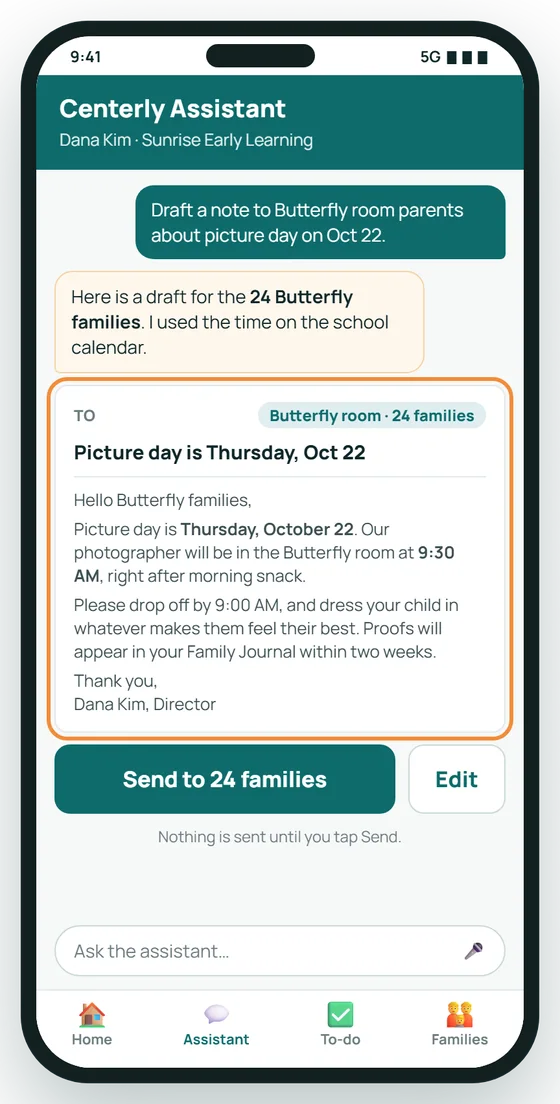
The assistant, on the director's phone
Dana asks for a note to Butterfly room parents about picture day. The draft is ready in seconds, and it goes out only when she taps Send.
You stay in control
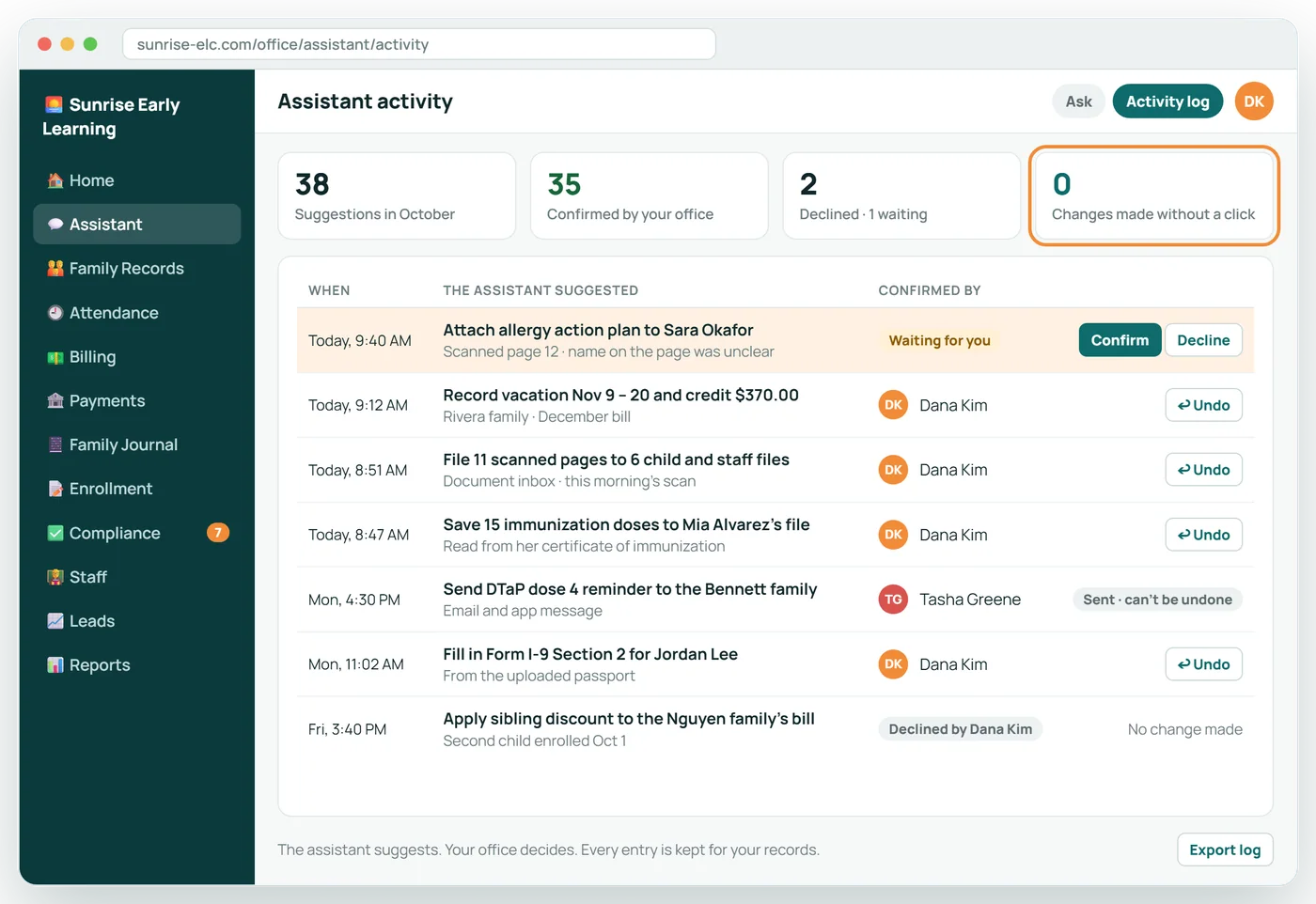
Every suggestion is logged with who confirmed it and when. Nothing changes without a click, and a confirmed change can be undone.
What it reads, and what it does with it
| Document | What it pulls out | What it checks | What it proposes |
|---|---|---|---|
| Immunization record | Child, date of birth, every vaccine, dose and date | Name and birth date match the file; each dose against your state's schedule; doses given too early | Add the doses; list what is missing and when the next is due |
| Hearing and vision screening | Child, date, screener, results for each ear and eye | Whether the child needs one by age; whether results are complete | Record the screening and clear the to-do item |
| Doctor's health statement | Child, provider, date, any restrictions | Date within the required period | File it and note the next due date |
| CPR and first-aid card | Name, course, issuer, expiry | Name matches the employee; right course; not expired | Accept and set the expiry reminder, or turn it away with the reason |
| Background-check notice | Name, result, date | Matches the employee; result is clear | Record it and set the renewal date |
| Notarized affidavit | Name, statement page, signature, notary | Every page present; statement answered; signed and notarized | Accept, or say which page or signature is missing |
| Driver's license or passport | Document type, issuer, number, expiry | Not expired; name matches | Pre-fill the I-9 for the employer to verify and sign |
| A parent's email | Dates, child, what is being asked | Notice period and credit rules in the family's agreement | Record the absence, prepare the credit, draft a reply |
The assistant can also be asked plain questions about your center's records, such as who still needs a screening, whose training hours are short, or which families have not set up autopay.
About Centerly Assistant
Which documents can it read?
Immunization records, hearing and vision screenings, doctors' statements, CPR and first-aid cards, background-check notices, notarized affidavits, driver's licenses and passports for the I-9, and signed enrollment forms.
Does it work with phone photos?
Yes. Parents and staff can photograph a document with a phone. If a photo is unreadable, it is turned away with a request for a clearer one.
Can it make changes without us?
No, with one exception you control: routine staff-document checks. When a staff upload passes every check, it is filed automatically. Switch that off and those wait for a click too.
What does it do with a parent email?
Paste the email in. If it is about a vacation or an absence, the assistant records the dates, checks the notice period in the family's agreement, prepares the tuition credit and drafts a reply for you to read.
Is it a chatbot?
It can answer questions about your records, such as who still needs a screening. But most of its work is done on documents and emails, not in a chat window.
Related features
When Licensing Visits
The inspector picks a few children and employees. Every file is already complete.
See it →ComplianceLicensing and Compliance
Know what an inspector would find, before the inspector does.
See it →Your teamStaff Onboarding and HR
From application to first day, with every document tracked.
See it →BillingTuition Billing
Tuition that follows each family's signed agreement, prorated automatically.
See it →See Centerly Assistant with your own center in mind
A 30-minute call, shaped around how your center runs today.